Changelog
what changed, and when
When something on the site changes, it turns up here with a note on what it does and, where a picture says it better than I can, a picture or a clip of it. Newest first.
If you want to support us with the server fees or the time spent on projects, feel free, but don't feel obliged to: patreon.com/c/TeaPK
Accounts, and somewhere to keep things between tables
v1.16-Alpha7 October 2026Accounts
Accounts
- To play: nothing changes. A seat is still a link, it works on its own with no account, and it always will.
- An account: an email address, a handle and a password. You verify the address from a link in your inbox. It is free.
- To run a table: starting a new campaign needs an account with its address verified and two-factor on. A Ref link opens every sheet at the table, and that is more than a password on its own should be holding.
- Two-factor: any authenticator app. You get ten recovery codes when you turn it on. Keep them somewhere that is not the phone the app is on.
- No more reference codes: nothing asks for one now, and any you still have written down open nothing.
- No cap on how many tables you run: this replaces the twenty to an address. Twenty new campaigns from one account in a day is the most it takes.
- Settings, at its own address: /settings. Your handle, your public page, your password, two-factor, Sign out everywhere, Take a copy and Close your account.
- Changing your password: it asks for the one you have now as well, and signs out every other device. Forgotten it? Press Forgotten your password? under the password box on the sign-in page.
- Take a copy: one file with everything the account holds, from your crows with their sheets and journals to the campaigns you own, your posts and your packs. It carries no links and no seat tokens.
- Closing your account: cannot be undone. Your crows stay at their tables as A former player, your forum posts keep their words under A deleted account, and each campaign you own is passed on, offered to its players for thirty days, or archived, depending on who is there. You are told which.
- Your email address: nobody else is ever shown it. Not your Ref, not your players, not anybody in the market or on the forum.
Moving your games onto an account
Moving your games onto an account
- A banner on every campaign: a strip across the top saying The Murder is moving to accounts. The owner of a campaign not on an account yet gets Attach it, and it comes back every time the campaign is opened until it is attached; it also says a new campaign can only be started from an account. Anybody whose seat is not saved to one gets Save this seat, and Not now puts that away for a day. It stays out of Owlbear.
- All my games: on the same strip, and at /migrate. Every game this device has opened, where each one stands, and the press that moves it. Save every seat does all of your seats at once.
- Any address works: sign up with whatever address you like, turn two-factor on, open the campaign on its Ref link and press Email a link to attach it. The link goes to the address the campaign was started with. Open it while signed in and the campaign is on your account, and its address becomes your account’s.
- The same address: sign up with the address a campaign is filed under and it attaches by itself once two-factor is on.
- An address that was changed: the link still goes to the one the campaign was started with, so a leaked Ref link cannot be used to point a campaign at somebody else’s inbox.
- No address, or a lost inbox: press Ask for it and a person looks at it. You get an email when it is decided, whichever way it goes.
- An inbox anybody can read: a campaign filed under a public inbox, Mailinator and the like, never attaches by itself and is never mailed a link. It goes through Ask for it.
- Players: never have to do anything. Saving a seat puts your crows on your account, sheets and journals and all, so losing a link no longer loses them.
- Every link keeps working: whether you move anything or not. There is no deadline.
Your games
Your games
- One page: Your games, beside Your account in the bar. The tables you own or co-own first, then the ones you play at.
- A table you own with no seat at it: still listed, marked no seat here.
- Co-owners: press Give them the run of it on a player who has saved their seat to an account. A co-owner can run the game and change the table’s settings, but cannot give the table away, archive it or bin it. Take it back whenever you like.
- Archive this table: read-only, and one press brings it back. Every sheet still opens.
- The table’s own settings: the filing address, co-owners, archiving and binning have moved into Seats and links.
- Your crows: every crow you own is on your account page, whichever table it sits at.
- Hand it on: emails a link to your own address for you to forward. Whoever opens it signed in takes the crow over at the same seat, sheet and journal and all. Sent it to the wrong person? Take it back, until they have opened it.
Starting a campaign
Starting a campaign
- Start a campaign: on the front page and on Your games, for an account that can own one. Four steps and a fifth with the links, and Create now on the first if the defaults will do.
- The steps: the campaign’s name and yours; how the Dungeon Turn runs (a timer and its minutes, 1d6 rooms, or When I say) and the encounter number; starting kits and anything to copy in from your library; and players, as seats by name, a join link, or invites to your friends.
- A join link for people with an account: is on by default and runs for a week. Untick it for none.
- The last step: your Ref link, every player link and the join link ready to copy, who was invited, and anything that did not go through, with where to do it instead.
- Later: all of it can be changed from the Ref’s side. Starting kits has its own tick on Your cards: Players can take the starting kit of the profession they rolled.
Inviting people
Inviting people
- One invite link per table: in the Ref console. Under How people join you can put a code on it that people type alongside their name, set how long it lasts (a day, a week, a month, or until you turn it off), and tick Murder accounts only.
- Rotate join link: kills the old one at once. Turn off stops anybody joining and keeps the link for when you want it back.
- Anybody already seated: keeps their seat through all of that. An expiry stops new people joining and takes no seat or crow off anybody.
- By name: offer a seat to somebody you are friends with here. It lands on their account page rather than in their email, and runs out in fourteen days.
- A seat link: still the way in for somebody who is not going to make an account.
- Whose it is: the invite link and its rules belong to the owner and any co-owners. Handing somebody the Ref role for an evening hands them the game and not the front door.
People
People
- Handles: one handle, one person, and no numbers stuck on the end. 3 to 20 letters, numbers, hyphens or underscores. A handle picked at sign-up can be changed once straight away, so a typo is not stuck.
- Your public page: a bio, your Discord, Reddit and Bluesky names, and up to four links. It is shown with your packs in the market, and it is in Settings.
- Finding somebody: type their handle exactly. There is no directory and nothing to browse.
- Friends: a request they accept or ignore. It is what lets you offer somebody a seat by name, and what My friends means on your library.
Your library, and the card creator
Your library, and the card creator
- Your library: on your account page. Cards, creatures, encounters, sets, roll tables and maps that belong to you rather than to a table, so they stay yours when you stop playing somewhere.
- The card creator, signed in: press Save to your library to keep the card you have made. Your cards are listed underneath, and Open loads one back into the form for Save changes. Signed out it works as it always has, and no card goes to the server.
- Out of a campaign: lift something out of a campaign you run into your library. The campaign keeps its own copy.
- Cards look like cards: in your library and in the market, drawn with the same face the sheet and the print sheet use. Creatures too, since they became cards of their own (below).
- Listed on its own for: choose Nobody, My friends or Everyone, with a line under the box saying what the choice does. My friends or Everyone shows its name, and a map’s picture, under Single things in the market. Seeing it does not let anybody add it. Everyone also lets it go in a forum post.
- Put it in the market: on any row. It publishes a pack holding just that one thing.
- As a file: save one kind or everything, and bring a file back in. It says what is in the file before anything is kept. With maps in it, the file is a .zip.
- Room: 120 cards, 60 creatures, 60 roll tables, 40 encounters, 40 sets and 200 maps.
Creature cards
Creature cards
- Make one in the card creator: switch it to A creature card. A creature has its numbers, other movement such as climb or swim, expertises and equipment, an attack table with the three result bands, features with uses (a rest, a round, a turn or a day), what the crows see, and notes for the Ref.
- Paste a statblock: and read it into the form. It fills what it can read, puts what it could not place under What the crows see, and you check the numbers.
- Printed: on the same A4 sheet as item cards. A feature with uses gets a box for each one, to tick in pencil. A long creature wants four or two to a sheet, and the sheet says when one is cut off.
- Kept and shared: save it to your library, take it away in a file, or publish it in a pack.
- In the Bestiary: press Edit on any card to open the same editor, or Write one in the editor to start a new one. Open the card shows the card itself.
- In a fight: a feature with uses has a button on each creature. Press it when that one uses it: three of the same creature count separately. Nothing refills it at a rest; press again past the last use to start it at none.
- Ours: the fifteen creatures in the Bestiary land as proper cards, with their attacks, features and notes in place.
Pets
Pets
- A Pets tab: on the sheet, after Cards, and a Pets room on the Ref’s side.
- Making one: for your own crow, like a sheet: type it in the creature editor or paste its statblock. The Ref can make one for any crow, or press Give as a pet on a Bestiary card. The pet gets its own copy of the card, without the Ref’s notes.
- On the tab: its Stamina, AD and wounds with plus and minus, its state, its attacks with a button to roll each, its features with their uses, and the whole card.
- Carrying: a pet with slots on its card carries cards. Put one of your own on it; Take off puts it back on the sheet, or says there is no room. Gear and Cards say when a pet has something.
- Let it go: when it leaves, or a summons ends. What it was carrying goes back on its crow’s sheet, or on the floor if there is no room.
- Who can change it: its crow’s player and the Ref. Everybody at the table can see every pet. Removing a crow takes its pets with it.
Maps
Maps
- Add a map: in your library. JPEG, PNG, WebP or GIF.
- 500 MB of your own: and as big as you like out of that. A copy of somebody else’s map does not count against it.
- Uploaded in pieces: a dropped connection carries on where it stopped. After a reload it asks for the same file again and checks it is the same one.
- A preview: the server makes a smaller picture of a map, and that is what the market shows. A map too big to draw says so and downloads as it is.
- Only the picture is kept: anything else in the file is taken out, such as where a photo was taken.
- Not for playing on: a map does not go to a table. Share it in a pack, and whoever adds it downloads it and opens it wherever they play.
Pictures
Pictures
- A face on your account: set in Settings. It is shown beside your handle on the forum and in the market.
- A face on your crow: set from your own sheet.
- On a forum post: up to six, added while the post is new, 4 MB each. Your browser shrinks a big photo before it is sent.
- What it takes: JPEG, PNG, GIF and WebP. Hidden metadata in a JPEG, PNG or WebP, a phone’s location included, is stripped on the way in.
- Report a picture: a forum picture has its own Report, a face goes through Report somebody with An inappropriate picture as the reason, and the desk can take either down.
- If the server is filling up: uploads pause by themselves and say so. Everything already uploaded is still there.
The market
The market
- Where: /market, and you can browse it with no account.
- A pack: cards, creatures, encounters, roll tables, sets and maps from your library, published under your handle.
- Add to my library: puts a copy of everything in the pack into your library, yours to change, and from there into any campaign you run. Editing yours never touches theirs.
- A pack’s own page: lists what is in it and every version it has had. Signed in, cards and creatures are drawn as cards.
- Comments: signed in, you can comment on any pack from its page and read what others have said. A pack’s comments are its own thread on Homebrew and packs, so you can reply to one, report one or block somebody from the forum as anywhere else there.
- Finding something: filters for what kind of thing is in a pack, which tiers it covers and how it is licensed, and a search over names and blurbs where every word has to land.
- Licences: CC BY, CC BY-SA, CC BY-NC, CC0, All rights reserved, or your own terms in your own words. Each one says in a sentence what it lets people do, and nothing is picked for you.
- Withdraw it: takes your pack out of the market. People who already added it keep it, and you can put it back.
- Whose work it has to be: yours. Typing MCDM’s playtest material onto cards for your own table is what the card creator is for. Publishing it, or a reworded version of it, costs the account its publishing for good and can cost the account.
- Blocking does not hide a pack: somebody’s published work stays in the market whether or not either of you has blocked the other.
- If a publisher is reported: two different people reporting the same publisher inside a day stops new copies of their packs for forty-eight hours while it is looked at. The packs stay listed and can still be read and backed, every copy already taken is untouched, and the publisher is not told.
- A takedown: stops the thing going back into the market in another pack: the cards inside a taken-down pack, a copy taken straight from it, and the same words put up again by the same account. A changed version is a different thing, and is judged if it is reported.
Pages, and backing a pack
Pages, and backing a pack
- Pages: earned by playing. One a week for each table you play at, up to three tables a week. You can hold twelve, and unspent ones fade, about half every three months. They cannot be bought or traded.
- When a table counts: three people with established accounts were at it that week, Monday to Sunday UTC: they rolled dice there, or ran its Dungeon Turn. Road, town and dungeon evenings all count. Established means a verified address, at least fourteen days old, and not barred from signing in. An account made in release week counts from the start. A seat with no account behind it does not count. When a table counts, a line in the dice log says so.
- Who is paid: everybody with an account who was at the table that week, the Ref included. Somebody who joins on the Saturday is paid on their first roll. A new or unverified account is paid too, and can spend once its address is verified.
- Making: when five different people with established accounts have taken a pack of yours, you get a page for it. Once per pack.
- Back it: spends one page on a pack. One per person per pack, ever, and never your own. You have seven days to take it back, even if the pack has left the market, and a pack you take a page back from cannot be backed again. After the seven days it stays. There is no marking anything down.
- Two ways to sort by backing: the first, Most backed lately, counts each backing once its seven days are up, and half as much six months later. The second, Most backed of all time, counts every backing not taken back.
- Pack of the week: the pack backed by the most different people in one week, at least three, shown at the top of the market and on the pack’s own page. It is decided once those backings can no longer be taken back, so it names a week about a fortnight ago. A publisher can have it once in four weeks. It earns no pages.
- On your account page: what you hold, how many tables have paid you this week, what you have earned in all, when the next one fades, and every pack you have backed, with Take the page back while its seven days last. What pages are, beside the balance here and in the market, says it in a paragraph, and Help has the whole rule.
The forum
The forum
- Where: /forum. Reading it needs an account, and posting needs the address verified.
- Four boards: they are Homebrew and packs, Rules talk, The app, and Everything else.
- Lately: every board in one list, newest activity first.
- Search: looks in thread titles and in the posts themselves, across every board. Every word has to land, though not in the same place, so goblin trap finds a thread called Goblins with a trap in the ninth reply.
- Kinds: three of the boards sort threads by kind, shown on the row: Homebrew takes Pack, Question and Feedback, Rules talk takes Question and Discussion, The app takes Bug, Request and Question. Picking one is optional.
- This answered it: on a Question thread, whoever asked can mark the reply that answered it. The thread says answered everywhere it appears, search results included. Nobody else can mark it, the desk included.
- Pictures and things: a post can carry pictures, and anything from your library listed for Everyone.
- Nothing expires: a post stays unless somebody removes it. A removed post is readable by the desk only and is deleted ninety days later.
Looking for game
Looking for game
- Where: /lfg, its own page beside the forum.
- A listing: what you wrote, the day and time you play in your own timezone, online or in person, and a region if it is in person. It never takes an address and never names a campaign.
- A week old: an account has to be seven days old, with its address verified, to post one. Three listings each at most.
- How long: shown for twenty-one days from when you last renewed it. Renew it to keep it up.
- Applying: you send a note, and the person who posted it sees your handle and your note and nothing else. They can Offer them a seat or Decline. Nobody is seated by it: the seat itself comes by name once you are friends, or as a link.
Chat at the table
Chat at the table
- In the dice log: lines sit among the rolls by time, and the box to type in is above the log.
- Who said it: each line has the crow’s name, the handle in brackets and the time. Hover for the full date.
- It needs an account: and the seat saved to it, because a line has to have somebody’s name on it. Everything else at the table works without one.
- Earlier chat: the newest thirty lines sit in the log, and Earlier chat in the dice panel has the rest, a day at a time.
- The Ref: can remove any line. It leaves a gap saying Removed, so the replies round it still read.
- Report and Block: on every line that is not yours.
- Kept a year: then it goes. Binning a campaign takes its chat with it.
The table
The table
- Gear: the Items tab is called Gear now.
- On a phone: the sheet comes first, and the dice tray is a bar along the bottom of the screen.
- Fourteen seat colours: six new ones (peat brown, woad blue, foxglove pink, kingfisher teal, ivy green and slate grey), each readable on every theme.
- Roll tables: the answer comes up in the table’s own card, where you pressed Roll, large enough to read out. Nothing scrolls. Rows can be edited one at a time, and pasting a whole table still works.
- Encounter tables on a phone: a creature takes a little over half the height it did, with the buttons beside its name and Armour and Reactions sharing a line.
- Roll up a new crow: asks first, and says the crow you have stays on the roster.
Owlbear, and the bestiary
Owlbear, and the bestiary
- A Creatures tab: in the Owlbear panel, on the Ref’s seat: the encounter, the round, the call for initiative, and each creature’s Stamina, Armour, Wounds and Reactions.
- A creature on a token: the GM, and only the GM, can press Link to a creature, then Open creature or Unlink creature. The token holds the creature’s id and nothing else, so a player reading it gets nothing.
- What we have met: the last page of a crow’s journal. The player writes it, the Ref can tell the crows they pick about something, marked as the Ref’s, and it travels with the crow. Nothing fills it in by itself.
Reporting, blocking and bans
Reporting, blocking and bans
- Report: on anything a person wrote: a pack, a post, a picture, a listing, an application, a line of chat. Pick a reason, add what you like, and it arrives with a copy of the thing as it was. Nobody is told who reported them.
- Report somebody: on your account page. The quickest way is still the Discord, and the panel says so first.
- Block: from wherever you can see somebody’s name. It takes them off your screens and you off theirs, neither of you is told, and you can take it off again.
- Bans: most name one thing, posting or chat or publishing or inviting, and that one door says no. A ban on the whole account says so when you sign in, with the date it runs out if there is one, and your block list, Take a copy and closing the account still work.
- The desk: has two roles. A moderator can take down a pack, a picture or a thread. Bans, and removing a single post or line of chat, stay with an admin.
What is kept
What is kept
- A page for it: /privacy, built from the code that does the deleting, with every clock on it.
- A campaign nobody opens: was deleted after a year. Now it goes read-only at a year, and is deleted six months after that. The address it is filed under gets an email about a month before it goes read-only, opening the campaign resets the clock, and an archived one comes back with one press until the six months are up.
- No address on file: a campaign nobody can be warned about can go read-only and is never deleted.
- Pictures and backups: every kind of picture is on the page now, and so is how long backups hold things.
Fixes
Fixes
- A sheet box the server refused: kept saying Offline, retrying, and took every edit after it down too. It says why now and drops only that box. Max uses takes 0 to 4.
- After the connection dropped: rolls and cards handed over in the gap were missing until a reload. They come back when it reconnects, and Reconnecting shows beside the dot.
- The pop-out dice window: went on showing its last roll after losing the table. It says so now.
- The card creator’s file: dropped a card’s usage die, with its refuel and trigger, on the way into a campaign.
- A roll table refused for one bad row: now says which row.
- The print sheet: outlines on screen any card it would cut off, as well as naming it.
- The Owlbear panel on the light theme: the tenth-wound question was unreadable and Accept vanished on hover.
- A big file brought into a campaign: over 256 KB, of cards, card sets or roll tables, was refused before it reached the app, with nothing said. It takes up to 5 MB.
- Rotating a seat’s link, or removing a seat: now closes any page still open on the old link. Before, that page went on hearing the table.
Editing a card no longer sends you round the houses
v1.15.2-Alpha20 September 2026Fixes
Fixes
- Reported in the Discord: editing a card that was already on somebody’s sheet could come back with “that card has no usage row… send it back to the pile and hand it over again”, and doing exactly that was the only way through. Even renaming one could be refused.
- What was happening: a card gets its usage row when it is handed out. A card that reached a sheet another way, by turning a typed box into a card, or by arriving when the usage rows were full, never got one, and after that every edit was refused.
- Now: the edit finds the row itself, the same way handing the card over would. The first free line, a light in the light table, a dungeon-turn effect in running effects. Nothing you have typed is written over, and a light arrives unlit.
- If there is genuinely nowhere: it still says no, and now it tells you which part of the sheet is full so you can clear a line, instead of sending you back to the pile.
The Cards tab, for players who had nothing yet
v1.15.1-Alpha19 September 2026Fixes
Fixes
- Reported in the Discord: the Cards tab appeared on a player's sheet only once there was a card they could already see at the table, so at a table with nothing written down yet a player had no way to write their first one. Players have been writing cards since the 6th, and the check that hid the tab was older than that. It is there for everybody now, whatever you are carrying.
Dice you can watch, and armour that wears down
v1.15-Alpha15 September 20263D dice
3D dice
- Everyone sees every roll: the dice tumble on every screen at the table, in the colour of whoever rolled, and land on the numbers in the log.
- Your own dice: open Dice settings, under the roll log, and pick a colour or keep your seat colour, a material (plastic, glass, metal or wood) and a pattern (skulls, feathers, paper, wood grain, clouds, fire, marble or speckles). Everyone at the table sees your rolls in them.
- Numbers stay readable: their colour is picked for you unless you choose one, and it tells you if the one you chose will be hard to read.
- A preview: the settings throw a pair of dice every time you change something, so you see them before the table does.
- Sound, if you want it: off unless you turn it on in Dice settings. Choose whether you hear only your own rolls or everyone's, the surface they land on (a wooden tray, a wooden table, felt or metal) and how loud. The dice sound like what they are made of, and the preview throws with sound so you can try a surface first. It is kept on your device only.
- You pick where they land: across the screen, in a box you drag and resize, above the roll log, or in a pop-out window of their own. That is in Dice settings too, and each device remembers its own.
- Or off: the same place. If your device is set to reduce motion, they start off until you choose.
- Twelve at a time: a bigger roll throws the first twelve and says how many there were. The log has every one.
- A d100, and dice with odd numbers of sides: these show in the log only, because the 3D versions would show a face that is not the one you rolled.
- They present the roll, they do not make it: the server rolls, the log records it, and the dice are drawn afterwards to match. Nothing about how rolls work has changed.
- Only loaded when you roll: the page is no heavier for anyone who never does.
Armour Defence on the cards
Armour Defence on the cards
- Asked for in the Discord: armour goes up and down a lot, so it should work like a quantity rather than a number you rub out.
- Where: the Vitals card on your sheet, and the Vitals tab in Owlbear.
- Every card with AD: what it has left out of its full, a minus and a plus, and Repair to put it back to full.
- What counts: the suit you are wearing from your backpack, and a shield or a Parry weapon while it is in a hand. Everything else folds away under Not soaking right now, and moves back up when it is in play.
- One suit at a time: carry one and it is worn. Pick up a second and the one you had on stays on; press Wear on the other to change into it.
- At 0: it stops soaking and stays on the list to be repaired. A Parry weapon at 0 also says your attacks with it take a point less damage.
- Parry weapons: the Knife, Sword, Glaive and Greatsword now carry their Parry as AD, including the ones already on your sheet.
- The Shield: arrives on the belt now, with the Sword and Knife, rather than in the backpack.
- For the Ref: the party panel shows each crow's total. Tap it to see which cards it is coming from.
- On paper: the character sheet prints the full AD with a space in front to write what is left, and importing the sheet reads that number back onto the card.
- Still typed if you prefer: a crow with no AD cards uses the two AD boxes on the sheet as before.
More tables, and binning one
More tables, and binning one
- Twenty tables to an address: up from four.
- Bin this table: whoever started a table can delete it, from the seat panel on the Ref link. It asks you to type the table's name first, because there is no undo.
- Everyone at it is told: anyone with the table open sees that it has gone, and the address it was filed under gets an email saying so.
Four ways it can look, and the Thief you could not take
v1.14-Alpha12 September 2026Light mode, and three more looks
Light mode, and three more looks
- Where: the picker at the foot of every page.
- Follow my system: the default. If your phone or laptop is set to light, you get light, and it changes with it at sunset.
- Dark: what the app has always looked like, unchanged to the pixel.
- Light: asked for by name, and the whole app rather than a washed-out version of it. Every colour was picked against the dark theme's own contrast, not lightened until it looked about right.
- Hallows: a guttering candle in a cold room. Oxblood ground, a serif for the headings, and the warning red pushed brighter so it still reads as a warning.
- Cold storage: blue-grey throughout, monospace headings, square corners.
- It is remembered per device: the choice lives in that browser and goes nowhere near the server, so your phone and your desktop can differ.
- Inside Owlbear: the link dialog, the panel and the pop-out each carry their own picker, at the bottom. They are framed by Owlbear rather than served as pages of this site, so they remember their own choice rather than the one you made here.
- Cards are still paper: a printed card is dark ink on white stock whatever the screen is doing.
The Thief and the Assassin could not be taken at all
The Thief and the Assassin could not be taken at all
- What happened: both carry two knives. A slot holds two of them and the card sits on the belt, and a belt loop holds one thing. All three are right, and together they made the set impossible to take, with a refusal about a quantity you never set on a card you had never seen.
- Now: two knives are two cards, on two loops, which is what you would do at a table.
- Every door: a player taking the set, the Ref handing it over, the Ref putting it down, and a player picking the profession they rolled. That last one is the one that mattered most, because it is the first night and it needs nobody to have set anything up.
- Already stocked one: a set sat in your cards is repaired on this update, with nothing to press.
- Nothing that stacks in a pack has changed: six rations are still one card of six.
Take the part of a set that fits
Take the part of a set that fits
- Before: a set that did not all fit was refused entirely, even when half of it had somewhere to go, and the message told you to send one card back when five were stuck.
- Now: it shows you the set, says where each card would land or that it will not, and you tick what you want.
- It re-checks as you tick: a card that said no room behind five others fits perfectly once it is the only thing you asked for, and the list says so.
- A set that fits is unchanged: same one-line confirm it always had.
- Half a set is not the set taken: you can come back for the rest once you have made room.
A way back to the front page
A way back to the front page
- The crow sits at the top of the FAQ, the changelog, the roadmap, the Owlbear page and the card creator, and it goes home.
- The TeaPK mark at the foot of the page does too, for the long pages where the top is a scroll away.
On a phone
On a phone
- Bigger to press: the colour swatches, the export links, the fold headings, every text field, the dismiss on the update bar, and the rows of links at the foot of every page. Only where there is no mouse: the desktop is untouched.
- Your name in the top bar: on a narrow screen it was being squeezed out entirely, leaving a dot and the word REF.
- A long location name: one encounter called something like "The collapsed stair below the chapel" was pushing the page wider than the screen and squeezing every other row to pay for it. It shortens with an ellipsis now.
Fixes
Fixes
- On a light page the ring round a seat colour was too faint to see, which meant the Ref's own dot, being bone white, was invisible. Whose roll is whose again.
- The FAQ said "No tracking, at all". It was not quite true: the card creator counts how many people have opened it and how many cards have been made, printed, saved or taken away. Five numbers with nothing attached to them. It says so now, and the overclaim is gone.
- Owlbear panels, the link dialog and the popped-out sheet all take the theme, and tell the browser which one so its own checkboxes and scrollbars match.
Cards, and what you do with them
v1.13-Alpha6 September 2026Watch what changed in this build
A card creator anyone can open
A card creator anyone can open
- Where: murder.teapk.gg/cards, and it is in the footer of every page.
- What it needs from you: nothing. No code, no account, no campaign, no install.
- What it does: type a card and watch it draw beside the form, the same card face the app prints and the same one that turns up in a slot.
- The sheet: put a card on it, make another, and print the lot. Nine, four or two to a sheet of A4, and it says when a card is longer than the size you picked and which size to try instead.
- Save one as a picture: a PNG, for a Discord post or a phone.
- Never made a card: two worked examples behind a fold, a torch and a talking greatsword, and a button that fills the form in with either so you can pull it apart.
- Where it is kept: in your browser and nowhere else. The sheet survives a reload. It never reaches the server.
- Taking it with you: the whole sheet comes out as one file, and Import cards in a campaign reads it.
- The crow: there is one on the page holding an access code. Click it.
Two things are called something else
Two things are called something else
- The shelf is Your cards.
- A "group" or "kit" of them is a set. Type a name that does not exist yet into the Set box to make one.
- Kit means a profession's starting kit and nothing else.
- A card at the table nobody is holding is the pile. It was that or "on the table" depending which part of the page you read.
- Nothing moved. Same cards, same places, same links.
Owlbear Rodeo is one extension now, not two
Owlbear Rodeo is one extension now, not two
- Install
murder.teapk.gg/obr/manifest.json. It carries the toolbar button and the token right-click menu. - It was two URLs and you needed both, and the second was easy to miss. Asked for a lot, so it is one now.
- If you added The Murder Tokens separately, you can remove it. Leaving it does no harm: both point at the same background page and only one copy runs in a room.
- Everyone who wants to click tokens installs it on their own Owlbear account. Installing it does not install it for your players.
The card creator
The card creator
- Write a card and it draws beside the form as you type.
- Fields: name, quantity, what it does, usage dice, how it comes back, what triggers it, where it is carried, stack limit, slots, AD, tags, a one-line summary, and a line the Ref reads out when it is found.
- Behind a fold: reach, attack, what happens on 11 or less, 12 to 16 and 17 or more, what it is made of, what it sells for.
- Markup in the text:
**bold**,*italic*,__underline__. A short key before a colon goes bold on its own. - Four faces to set it in: the book face, plain, typed, old.
- Save a card as a PNG, or print any of them nine, four or two to a sheet of A4.
The playtest's own cards, already in
The playtest's own cards, already in
- I have pre-made the playtest's cards and filed them into a set per background: all 36 professions, plus the shops, the armoury and the hoard. Around 185 cards.
- Each carries its usage dice, its damage tiers and its price where the packet gives one.
- These sets are MCDM's, not mine: when the playtest ends they are wiped from Your cards.
- What stays when that happens: anything already on a crow's sheet, anything on the pile, and any card a Ref has rewritten.
- A Ref hands a set out, or ticks it open and players take their own.
Your backpack, laid out the way the sheet is
Your backpack, laid out the way the sheet is
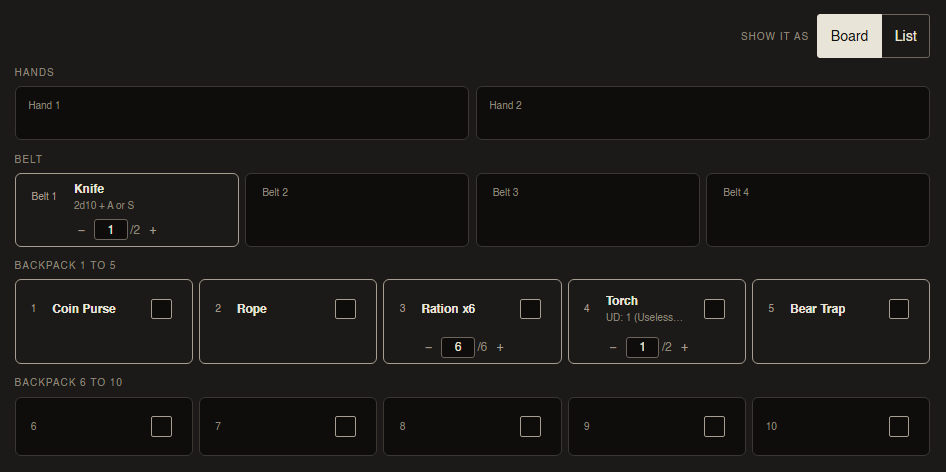
- Two hands, four belt loops, ten pack slots, with your cards drawn in the boxes they are in.
- A four-slot armour lies across four boxes and each part says which part it is.
- Drag a card between boxes and the sheet follows.
- Quantity is a minus, a number and a plus in the slot. It stops where the packet says a slot stops.
- Board / List switch at the top. It remembers which you picked.
Handing something over
Handing something over
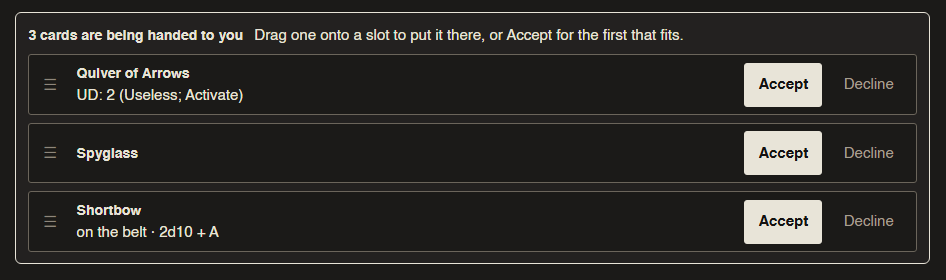
- Type the card once, tick who gets one.
- A tray at their end: drag the card onto a box, or press Accept for the first slot that fits.
- No room says so on the tray. It used to be written into a paragraph the tray covered, so Accept on a full pack looked like a dead button.
- An offer belongs to a crow, not a seat. Roll a new crow after your Ref handed you a kit and the kit was addressed to the crow you put down: they could see it, you could not. Fixed.
The floor, base, and passing things about
The floor, base, and passing things about
- The floor is this room. Base is the cart, the camp, wherever you keep coming back to.
- A card in either leaves your sheet and the whole table can see it and take it, without going through the Ref.
- Players can hand each other cards. It lands in their tray. Before this it was refused outright.
Cards where you're actually playing
Cards where you're actually playing
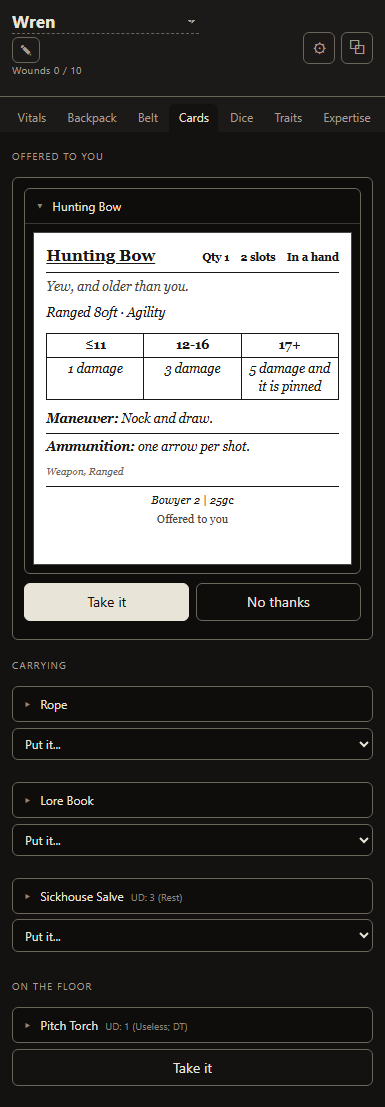
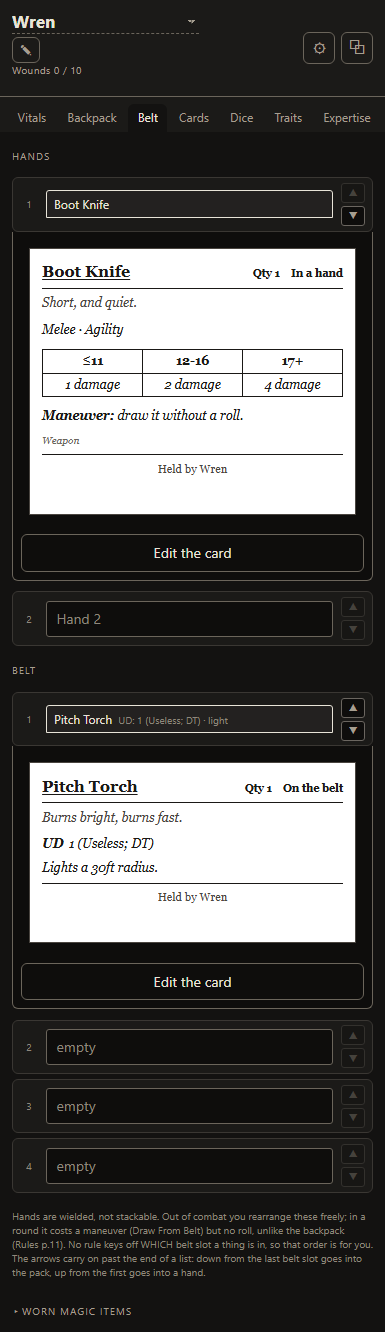
- The Owlbear panel has a Cards tab: the card itself, with its dice, its tiers and its rules text.
- The Backpack and Belt tabs draw the card sat in each slot. Press it and it opens where you are looking.
- Edit your own cards from the slot: the fields that change mid-session.
- Write a new card without leaving the map: name, what it is, which slot.
- Answer an offer and put a card on the floor from the panel.
- The offer popover shows the whole card, not a name.
- Click somebody else's token for their kit, read-only.
- A box you typed a note into stays a box you type in. If it disagrees with the card, the panel says which one prints and offers to put the card back.
Trading, when neither of you has a spare slot
Trading, when neither of you has a spare slot
- Press Trade for… on a card somebody else is carrying and pick what you give.
- Both cards leave both sheets at once, so two full packs works. Giving either one away first was refused for no room.
- All or nothing: it goes through whole or nothing moves.
- Move either card in the meantime and the ask comes off.
- On the strip at the top of the sheet, and in the Owlbear panel.
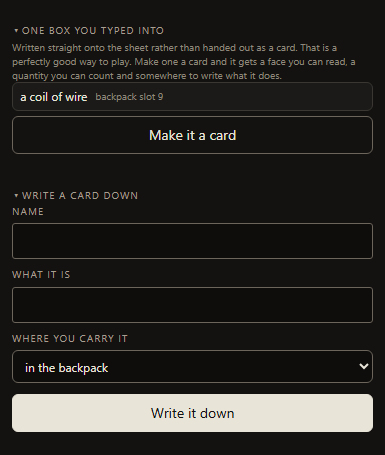
A slot you typed into can become a card
A slot you typed into can become a card
- The Cards tab lists the boxes you have typed into that are not cards.
- One press makes one a card, in the box it is already in.
- A count you wrote is kept: chalk x12 becomes twelve chalk.
- Nothing else is guessed. It lands with a name and you fill the rest in when you want.
Armour you can actually move
Armour you can actually move
- A card that takes two slots has to sit in two next to each other (Rules p.10). The arrows used to refuse to move it at all.
- The arrows now move the whole run, from either half, and what it meets comes back into the space it left.
- Drag it and it swaps block for block: two boxes for two, four for four.
- Dragging: take hold of the card itself, not the small slot number in the corner. The number still works and it is the one a keyboard reaches.
- Hands, belt and pack: it moves between them now. It could not before, which meant a suit of armour that reached your pack could never be picked up again. What is in the way comes back to the boxes it left.
- It still will not hang off the end of a row, and it still will not split another multi-slot card. It names the card in the way.
- A card cut in half by the end of a row is one card again: it was drawing a quantity box per half, so an armour read as two suits of armour.
The Ref gets to play too
The Ref gets to play too
- Play a crow puts your crow on the party board, in the rest, and in the turn order. It used to only tidy the console away.
- Press it again to step off. You stay the Ref; nothing is handed over.
- Handing the refereeing to somebody else moved up beside it. It was in the menu on a player's row, and Play a crow hid the console it lived in.
- A Ref can take a starting kit and be handed cards. Both were closed to them.
The encounter
The encounter
- A fight has a name and there can be several. Build one while the crows are elsewhere and put it out when it starts.
- What is not out is not sent to anybody's browser.
- Crows go in the fight. Calling for initiative ticks the round over and clears everybody's turn.
- Players mark their own crow as gone.
- The app rolls no initiative.
- This one is a first pass: enough to build a fight, put it in front of the table and run the round counter. The rest of what a Ref wants out of an encounter is coming, and what is here is as much a look at the shape of it as a finished thing.
Smaller things
Smaller things
- Everything folds by pressing its heading. There were three different controls doing that.
- Only the pack stacks. Hands, belt and worn slots have lost the minus and plus.
- The Dungeon Turn puts a notice on the strip when the turn is up, not only on the clock face. Second sound to choose: a crow.
- Printed cards come out straight-edged and stopped falling off the page.
- A way back to the table from the FAQ, the roadmap and the changelog.
- "Tear up" is Delete. "Put it down" is Back to the pile.
Fixes
Fixes
- The print page and the front page no longer scroll the window sideways on a phone.
- Labels and column headings were 10px. They are 11. Cards keep their printed sizes.
- Bigger to press: the quantity minus and plus, the "⋯" menus, fold headings, bold and italic inside a sheet field, and the link rows at the foot of the page.
- A card written after you had ordered your pile landed in the middle of it instead of the end.
- An underline inside a bolded key printed the underscores.
- Every Owlbear panel that opened logged an error over one line of styling.
- The Thief and the Assassin could not be taken at all. Both carry two knives, and stocking the set wrote them as one card of two on a belt loop that holds one thing, so taking it, handing it out and exporting your cards to another table were all refused, and renaming the card quietly lost a knife. Two knives are two cards on two loops now, and a set already sat in your saved cards is repaired on this update. Nothing that stacks in a pack has changed: six rations are still one card of six.
Next build
Next build
- Pets: a pet is a statblock with its own carry slots (the Ref book prints the dog, the donkey and the elephant). The server side is done; the screen for it is not, so it is not in this build.
Your crows, on the map
Your crows, on the map
v1.12-Alpha30 August 2026
Click a token, get the sheet
Click a token, get the sheet
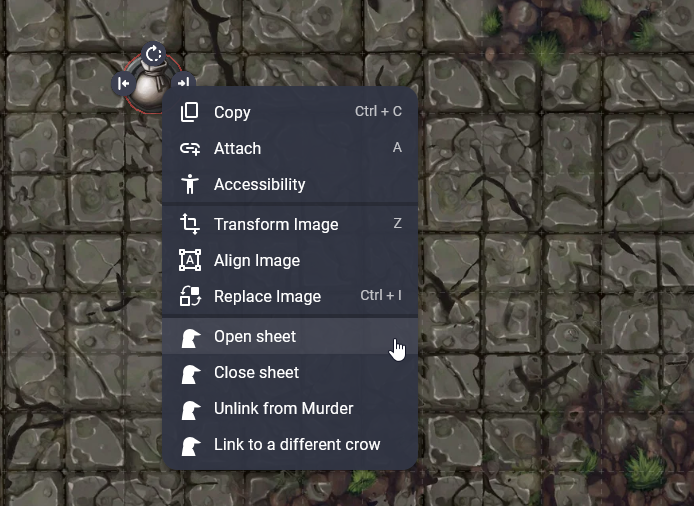
If your table plays on Owlbear Rodeo you can link a token to a crow now. Right-click it and the sheet opens in a small panel in the corner of the map, and it stays there when you click the scene behind it. Click your own token and you get the editable one, because your browser knows which crow is yours. Everyone else's stays a look and nothing more, which is about right: at a real table people lean over and read each other's sheets, they just don't write on them.
Linking a token is a right-click and a name off a list: the extension knows who is at your table, so there is nothing to copy and nothing to paste. You are picking a person rather than a crow, on purpose, so when one dies and they roll up the next, every token pointing at them catches up on its own and nobody relinks a thing.
It's two extensions, and everyone who wants to click tokens installs them on their own account, so you doing it won't do it for your players. Any of them can link their own token once they have. There's a page that walks you through it, linked from the bottom of every page and folded into your seat panel so the links are sat where you are when you want them.
The panel itself
The panel itself
Six tabs in a box small enough to sit beside a map: vitals, backpack, belt, usage dice, traits and expertise. It writes straight to your sheet, so the full version in another tab keeps up as you go. Wounds, stamina and the Speed penalty are all in there, and it'll tell you when the table takes a rest instead of letting the numbers move behind your back.
Hide the tabs and the blocks you never look at. If you'd sooner have it on a second screen, pop the whole thing out into a window you can drag and resize, and it'll remember where you put it.
Swap crows without leaving the map
Swap crows without leaving the map
Your name at the top of the panel is a dropdown. Pick any crow on your seat and the panel moves to them, and so does every token on the map pointing at you. The same list rolls up a new one, which is the bit that matters: a crow dying is a mid-session thing, and it used to mean leaving Owlbear to go and find the full sheet. The one who died stays on your seat so you can look back at them. Six to a seat is still the limit for now, while this is being tested, and it'll go up when I get a chance.
Nobody else can do it to you. Somebody else's token opens read-only and has no dropdown at all.
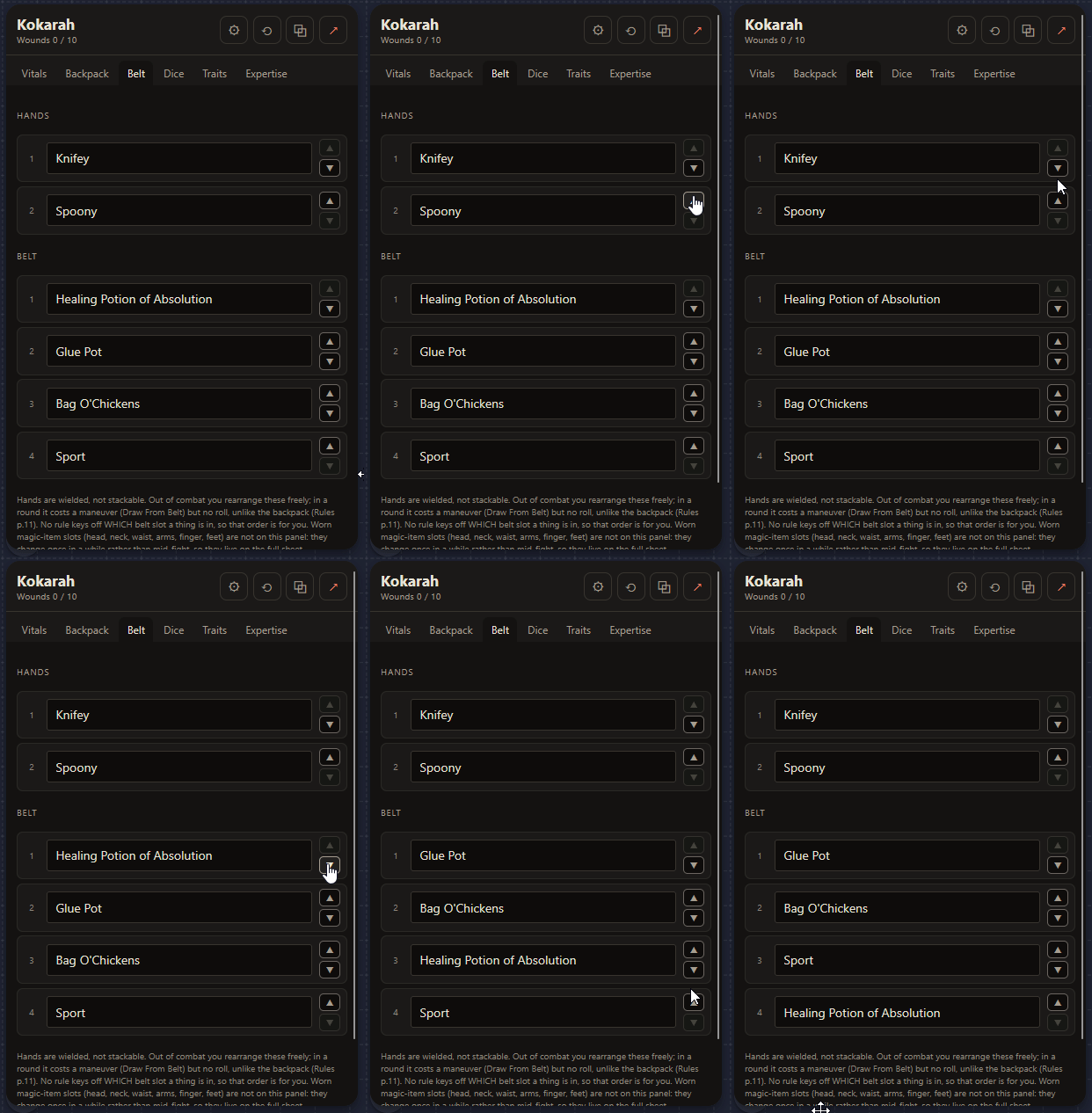
Move things around your belt
Move things around your belt
The backpack has had arrows for a while, because a backpack slot number is a real thing you roll against. Your belt and your hands have them now too. Nothing in the rules cares which belt slot a thing sits in, so that order's yours to keep however you like. One correction while I'm here, because the app had this wrong for a day and somebody may have played a session on it: rearranging your hands and belt mid-round does cost a maneuver. It just doesn't cost a roll, the way the backpack does.
Tidier seat list
Tidier seat list
The rare things you do to a seat, rotating a link and so on, have folded into a small menu at the end of the row. They were four buttons you press about twice a year, sat there looking important.
One thing to check on your item tracker
One thing to check on your item tracker
The usage dice boxes used to want two marks in the one grid: shade a box for every die an item has, then cross them off as they go. That's more bookkeeping than the game actually asks for. Now one box is one die, and a ticked box is a die you've spent. So if you'd been shading boxes to show how many dice something has, those will read as spent now. Clear them, and tick as they go.
Let the table show itself in
Let the table show itself in
v1.11-Alpha29 August 2026
One link the whole table joins with
One link the whole table joins with
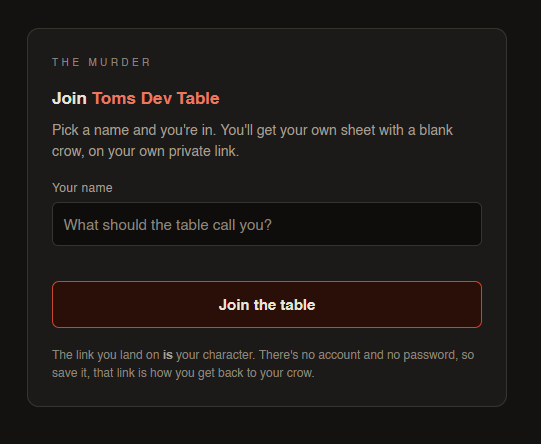
Setting a table up meant sending every player their own link, one at a time. Now it doesn't have to. Open a join link in the Ref console, drop it in your group's channel, and anyone who clicks it picks a name and lands on their own sheet with a blank crow. It sits alongside the old invite button rather than replacing it, so if you'd sooner hand links out one by one, nothing's changed.
And you keep the keys
And you keep the keys
A join link is a way in, not a way to snoop. It only ever makes somebody a player seat of their own and never reaches another crow's sheet. If it turns up somewhere you didn't mean it to, rotate it and the old one stops working, or turn joining off altogether. Anyone who let themselves in is marked in your roster, so you can always see who came in through the front door.
Move things where you want them
Move things where you want them
v1.10-Alpha28 August 2026
Drag your sheet into the order you want
Drag your sheet into the order you want
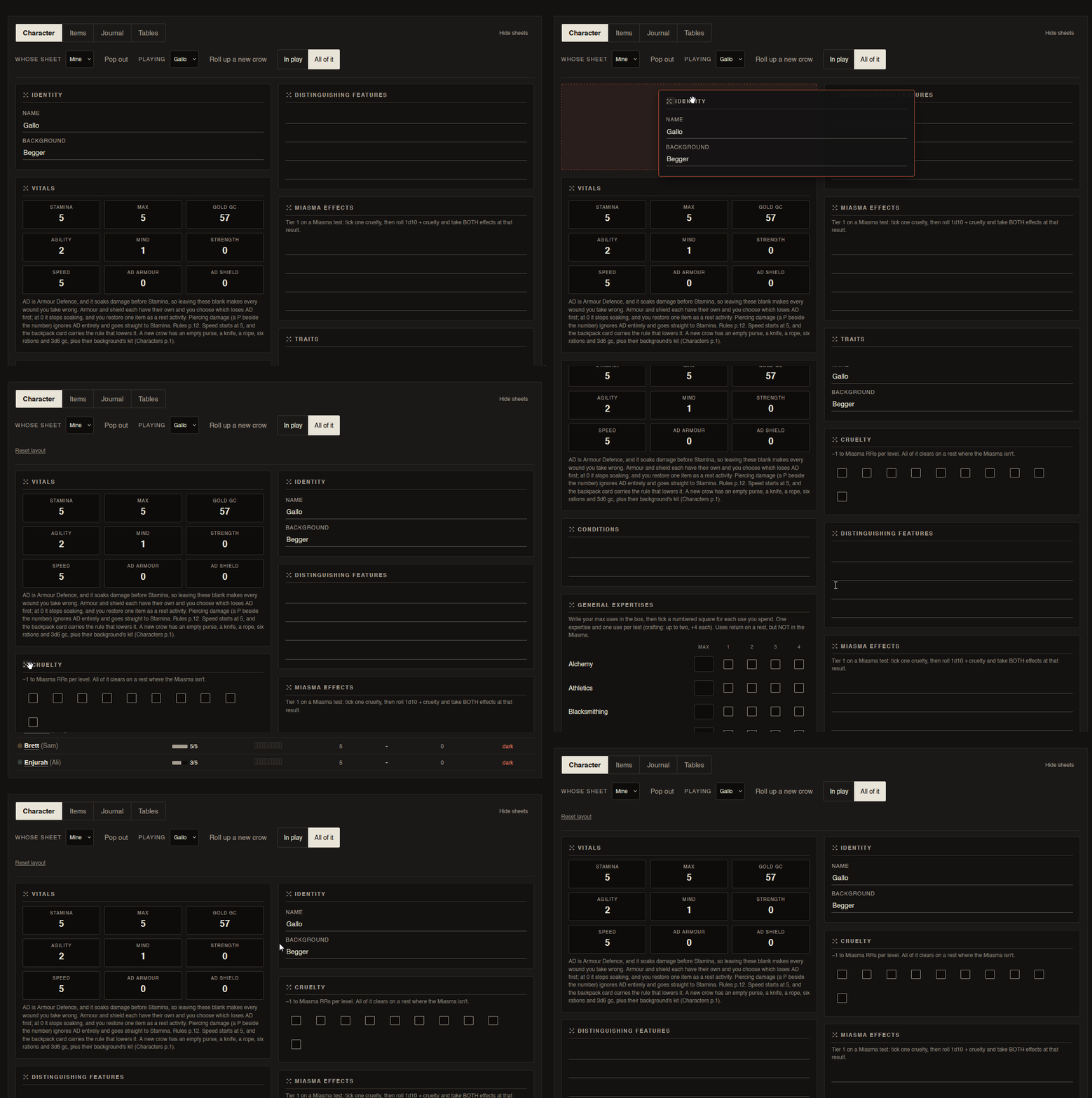
Your sheet always came in a fixed order, and that order was mine rather than yours. Now it isn't. Grab a card by the handle in its corner and drop it wherever it makes more sense to you, Vitals up top, Experience out of the way, whatever suits how you play. It only changes how the sheet sits on your screen, so the PDF you export comes out exactly as it did before.
Reorganise your backpack
Reorganise your backpack
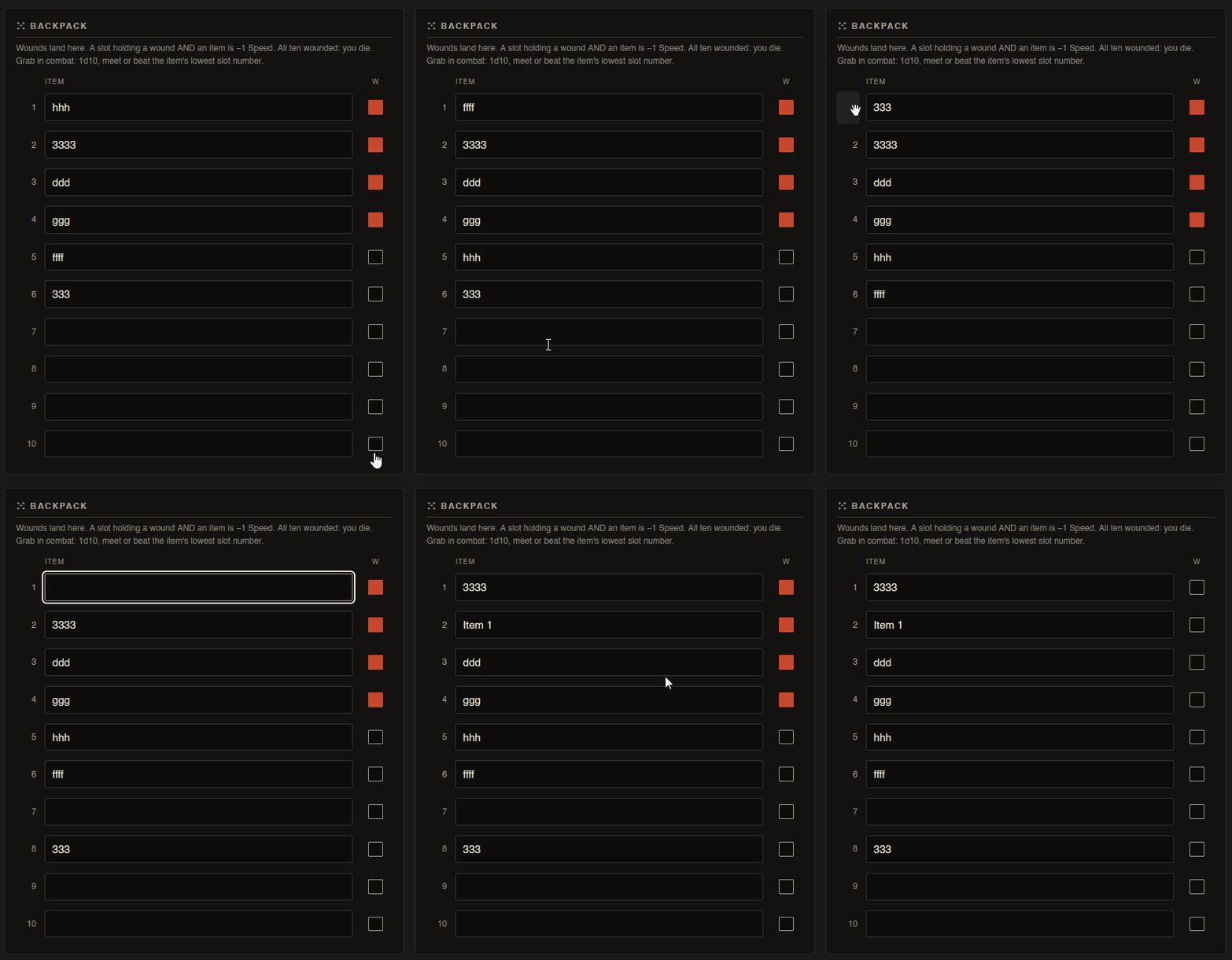
Same idea, one shelf down. Drag one backpack slot's item onto another and the two swap places, so you can shuffle your kit into whatever order the grab-in-combat roll wants. The slot number is the handle now, so there's something real to take hold of on a phone. One thing that deliberately stays put: a wound. A wound is where the crow got hurt, not a thing you tidy away, so the item moves and the wound stays on its slot.
And a few smaller things
And a few smaller things
- Roll tables take a die: set the die a table rolls on, rather than being stuck with whatever it started life as.
- A nudge to bookmark: your link is your way back in, so the page offers a hand keeping hold of it.
- Crows on the front page: a few of them, pecking about. Mostly for the look of it, though there was a caching bug hiding behind them that would have frozen them mid-hop, and that's sorted.
The road, and a table you can take with you
The road, and a table you can take with you
v1.9-Alpha26 August 2026
A day on the road
A day on the road
Travelling is not a dungeon and the app stopped pretending it was. A travel day carries its own encounter number, and two of them: one for the miles and one for the night, because a quiet road and a bad camp are not the same risk. The four roles for the crows who are not driving hang off the same panel, so the person navigating and the person keeping watch are written down rather than remembered.
It folds away when nobody is travelling, which is most of the time. The Ref still decides what happens out there. The app only counts.
Roll tables you can edit, and take with you
Roll tables you can edit, and take with you
Tables got their own tab, somewhere to be written rather than pasted once and left. Change a row, change the die, roll it in front of everybody. And you can export the lot and load them into another campaign of yours, which matters more than it sounds: a Ref who has typed a hundred rows should type them once in their life.
Paste a picture into the journal
Paste a picture into the journal
A map somebody sketched, a photo of the note the party found, whatever you have. It goes in the journal beside the writing, and the journal belongs to the table rather than to one person.
The sheet on a phone
The sheet on a phone
It was 8.6 screens of scrolling, with the numbers you need mid-fight buried under two thousand pixels of expertise grid. The printed sheet is two pages, front for what you touch in play and back for what moves between sessions, and that split is now a control: In play or All of it. Down to about three screens.
And a few smaller things
And a few smaller things
- Who is at the table, and who is running it, at the top of every page, with each person's colour following them everywhere they turn up.
- Something's wrong, a button inside a campaign that sends me the report along with which build you were on and which page you were looking at, because "it broke" without those is a guess.
- Pop out opens a window rather than a tab, so a sheet can sit on a second screen where you want it.
Cards, tables, and the way back in
Cards, tables, and the way back in
v1.8-Alpha25 August 2026
Item cards, and handing a thing over
Item cards, and handing a thing over
The first version of the thing this whole app was started for. Treasure gets found once and ends up on four sheets, and doing that by reading it out while four people write it down is the friction worth removing. Type the card once, say who gets one, and it lands on their sheet.
Roll tables
Roll tables
Type a table in and roll on it in front of the whole table. Ours come with it as examples, including a loot table, and they are ours rather than the packet's: the rules are MCDM's and not mine to reproduce.
A filled PDF, read back in
A filled PDF, read back in
Already got a character sheet filled in on paper, or in a PDF reader? Upload it and the app types it up for you, box by box, rather than asking you to do it again. Export still goes the other way, onto the same fillable sheets, so paper stays a real option in both directions.
The way back in
The way back in
A seat is a link and it stays one, but a link can be lost, so the campaign now asks for an email address when you make it. That address is the only thing that gets a lost Ref link back and it is used for nothing else. This browser also remembers the tables you have opened on it, which rescues a closed tab and nothing more, so the email stays the copy that survives a wiped laptop.
And a few smaller things
And a few smaller things
- A second table costs no code: the reference code is the door to the alpha, not a licence for one game, so running two campaigns does not mean asking me twice.
- A way across between the tables you already run, without going back to the front page and digging out a link.
- An example campaign you can actually open and press things in, rather than a screenshot of one.
- d66, for the tables that want it.
The Ref gets a screen, and a seat gets a roster
The Ref gets a screen, and a seat gets a roster
v1.7-Alpha24 August 2026
A screen shaped like the job
A screen shaped like the job
Refereeing is not playing a crow, and the page had been pretending otherwise. The Ref gets their own side of the table: open any crow's sheet, read it, fix the number somebody fat-fingered. And a Ref who wants to play one of their own can, without handing the campaign to anybody or logging in as somebody else.
A seat owns a roster
A seat owns a roster
Crows die. Before this, a dead crow meant a dead link, which meant the player needed a new one and lost everything attached to the old. Now a seat holds up to six of them: roll a new one, switch between them, and the dead stay readable. Your link is yours for as long as you are at the table, whatever happens to the bird.
The journal, and it belongs to the table
The journal, and it belongs to the table
Somewhere to write down what happened, shared, so four people are not keeping four half-versions of the same session in four notebooks. Your own pages further down are yours alone.
And a few smaller things
And a few smaller things
- 1d6 rooms as a way to end a Dungeon Turn, counted off as you go, for tables who would rather not run a clock.
- The log became a session rather than a list of dice: rests, deaths, turns and encounter checks all land in it, so reading it back the next morning tells you what happened.
- A village and its ties, kept against the campaign rather than against one crow's sheet.
The first build
The first build
v1.6-Alpha21 August 2026
Written up after the fact. This lot shipped before there was a changelog to put it in, and it is most of what the app is, so it is here rather than nowhere.
A table, and a link each
A table, and a link each
A campaign, a seat for everybody at it, and a character sheet and item tracker matching the print versions box for box, saved as you type. A seat is a link: send it and your player is in, on whatever they have got in their pocket, with nothing to install and nothing to sign up for.
The dice, in front of everybody
The dice, in front of everybody
Every roll lands on every screen at once, with the tier it came out at and a crit that is hard to miss. Edges and banes are asked for before the roll rather than guessed at afterwards, and an expertise can be spent after seeing the result to lift the tier, which is what the rules actually say. Prefer your own dice? Roll those. Nothing here makes you use it.
Under it, every roll is chained to the one before it, so the log cannot be quietly edited after the fact. Nobody has to care about that, and it is there anyway.
The Dungeon Turn, on every screen
The Dungeon Turn, on every screen
One clock the whole table reads, from a minute to four hours, or no clock at all if you would rather call it yourself. The encounter check at the end of it stays yours alone.
Paper when you want it
Paper when you want it
Export any sheet back onto the fillable PDFs and print it, the same boxes in the same places.