What this does
You point a token on your map at somebody at your table. After that anyone can click it and read their sheet: wounds, stamina, what's in the pack, what's on the belt. Click your own token and you get the editable one, because your browser knows which seat is yours.
It's the compact panel rather than the full sheet. Six tabs in a small box that sits in the corner of the map and stays put when you click the scene behind it. You can pick which of your crows you're playing from in there, and roll up a new one when the last doesn't make it.
Install it
In Owlbear Rodeo, open Extensions, press the + at the top right, and paste this into Install Link. It'll show you a card naming the extension before you commit, so if that card doesn't appear the URL hasn't landed properly. Press Add.
…
Everyone who wants to click tokens has to do this on their own account, you and your players alike. One person installing it doesn't install it for anybody else.
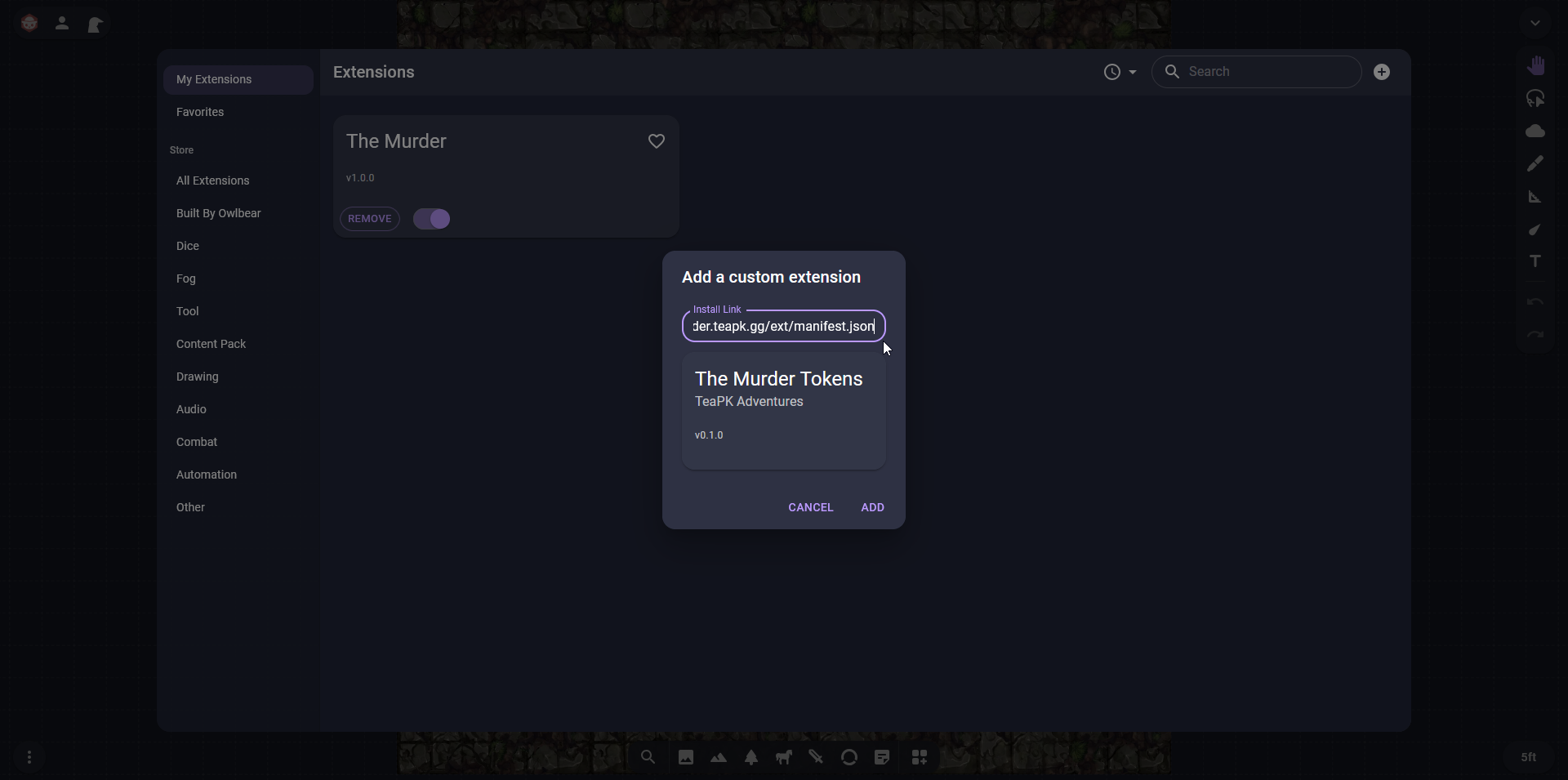
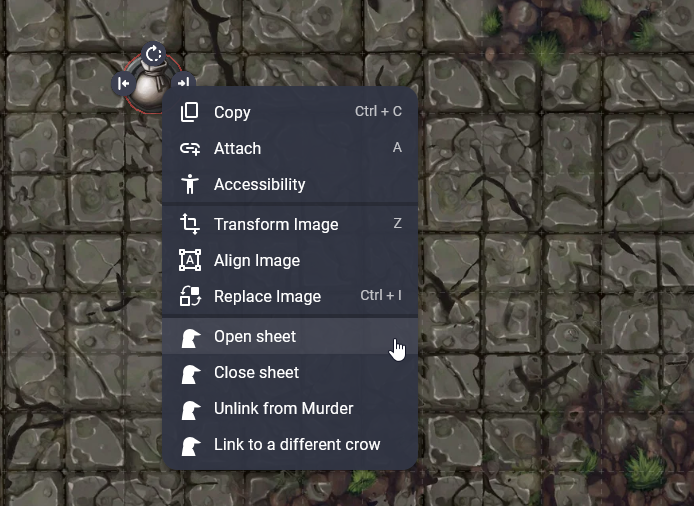
That one link is both halves. It puts Open sheet, Close sheet, Unlink and Link on the right-click menu of a character token, and it puts a button on the toolbar that opens your own sheet wherever you are. Paste your seat link into that button once and it remembers, and that is also how the token menu knows which crow is yours: click your own token and you get the editable panel rather than a read-only look at yourself.
Installed two of these before?
It was two URLs until now, and the second was easy to skip. If you have The Murder Tokens in your extensions list as well as The Murder, you can remove The Murder Tokens: the one above does everything it did.
Nothing breaks if you leave it. Both point at the same background page, and only one copy of that page does the work in any given room, so you will not get the menu twice or a hand-out announced twice. It is an entry in your list that does nothing.
…
That's the old address, in case you want to check which one is which.
Link the tokens
Two separate jobs here, and only one of them is the Ref's.
Everybody installs the extension above and pastes their own seat link into the toolbar button once. Without that, clicking your own token gets you the read-only panel, and nobody can do that part for you.
Somebody then links each token, once. Usually the Ref, but any of you can do it, including your own. It only has to happen once per person: the link lives on the scene, so a player who turns up three sessions late just installs the extension and their token already knows them.
Point a token at somebody
Right-click the token, choose Link to Murder sheet, and pick the name off the list. That's it. The list is the people at your table, with you at the top, and it comes from the seat link already sat in the extension, so there's nothing to copy and nothing to paste.
You're picking a person, not a crow. The token shows whichever crow they're playing at the time, so when one dies and they roll up the next, every token pointing at them catches up on its own and nobody relinks anything.
A new map needs the tokens again
A token's link lives on the token, and tokens belong to a scene, so a fresh map starts with tokens that know nothing. Copy the linked ones across instead of placing new ones and the links come with them, which is the quick way. Otherwise it's a right-click and a name each, the same as the first time.
Making that automatic is on the list. I had a go and it did not work, so rather than leave something half-doing it, it does nothing and says so.
If you point it at the wrong person
Right-click and pick Link to a different crow, or Unlink from Murder to strip it back to an ordinary token. You never have to delete one and lose its artwork and its place on the map just to fix a link.
Linking a crow at somebody else's table
The list only knows the table your own seat link belongs to. A token for a crow at another table is linked by somebody with a seat at that table, the same way: right-click, Link to Murder sheet, pick the name. Never paste an Invite link onto a token. That is the person's key to the campaign.
Which crow you are playing
Open your own sheet and your name at the top is a dropdown. Pick any crow on your seat and the panel moves to them, and so does every token on the map that points at you.
The same list rolls up a new one. When a crow dies mid-session, choose + Roll up a new crow and you're playing them, without leaving the map to go and find the full sheet. The one who died stays on your seat so you can look back at them. Six to a seat is the limit while this is being tested, and it'll go up when Tom gets a chance; the option goes away when you're at it.
Somebody else's token opens read-only for you and has no dropdown, so nobody picks your crow but you.
Players: getting your own sheet
Press the toolbar button once and paste your seat link, the /c/ one your Ref sent you. That's the only time you need it. After that the button opens your sheet, your own token on the map opens it editable, and you can link your own token yourself without waiting on anybody.
Everyone else's tokens stay read-only for you. You can look at anybody's sheet, the way people lean over and read each other's at a real table, and you can't write on it.
When it doesn't work
Nothing happens when I right-click a token
Two things to check. The extension isn't installed on your account: each person does their own, and your Ref doing it does nothing for you. Or the token isn't on the Character layer, which is the only layer the menu turns up on.
It says the link is finished
The link on that token has gone stale. Right-click it, pick Link to a different crow, and choose the person again off the list. Anything you linked before the end of August 2026 will want this doing once.
My own token opens read-only
Your browser hasn't been told which crow is yours yet. Open the toolbar button, paste your seat link, click the token again. Owlbear keeps that per browser, so a new laptop or a cleared browser means doing it once more.
Worth knowing
A link sat on a token can be read by everyone in the room, deliberately, and it keeps working outside Owlbear. Treat it as public to your table: anybody who's been in that room can keep reading that sheet afterwards. Nobody can write to it without the seat link, and that's yours alone and never goes near a token.
This is a fan tool. It isn't an Owlbear Rodeo feature and MCDM had nothing to do with it, so when it breaks it's mine to fix. Come and tell me.